Quick question: How can you make sure that those who arrive on your website become paying customers? Do you have a compelling enough call to action? Is the user experience being optimized with the use of data?
A well-designed landing page can help you convert online visitors into consumers. It is important in many marketing programs, such as PPC ads, social media, and email marketing, to generate sales and income. The HubSpot report revealed that the average landing page conversion rate across all sectors is 5.89%.
Let’s get down to learn how to make a landing page, get optimization tips, and more.
How to Create a Landing Page
Building high-converting landing pages involves careful preparation and execution. In this section, we’ll go over the procedures of how to create a landing page.
1. Define your audience and set specific goals
To define your audience, figure out who is interested in your product or service. Knowing this helps you create landing pages that speak directly to them and drive results. When designing your landing page, keep your brand and goals in mind. This will make sure your page matches your website and delivers a clear message.
For example, at Rankfast, our target audience is eCommerce business owners. We’ve designed our website and landing pages with clear, concise messaging that speaks directly to them.
Follow these landing page best practices:
- Describe your product or service: Know everything about what you’re offering and how it benefits your customers.
- Understand your audience: Collect key details like age, job, income, and location about the people you’re targeting.
- Do market research: Use surveys, focus groups, and social media to learn about your audience’s needs and problems.
- Create a buyer persona: Build a profile of your ideal customer based on the info you’ve gathered.
2. Select a landing page template
The next step is designing a landing page that works well. Many website builders offer different templates for various needs, and you can easily customize them to match your brand.
Before picking a template, think about your brand and what you want to achieve. This way, your landing page will fit with the rest of your website and keep the same brand message.
3. Customize your landing page design
Here are landing page best practices for customization:
Create a strong hero image: Use a large, eye-catching image at the top of the page to show visitors what you’re offering.
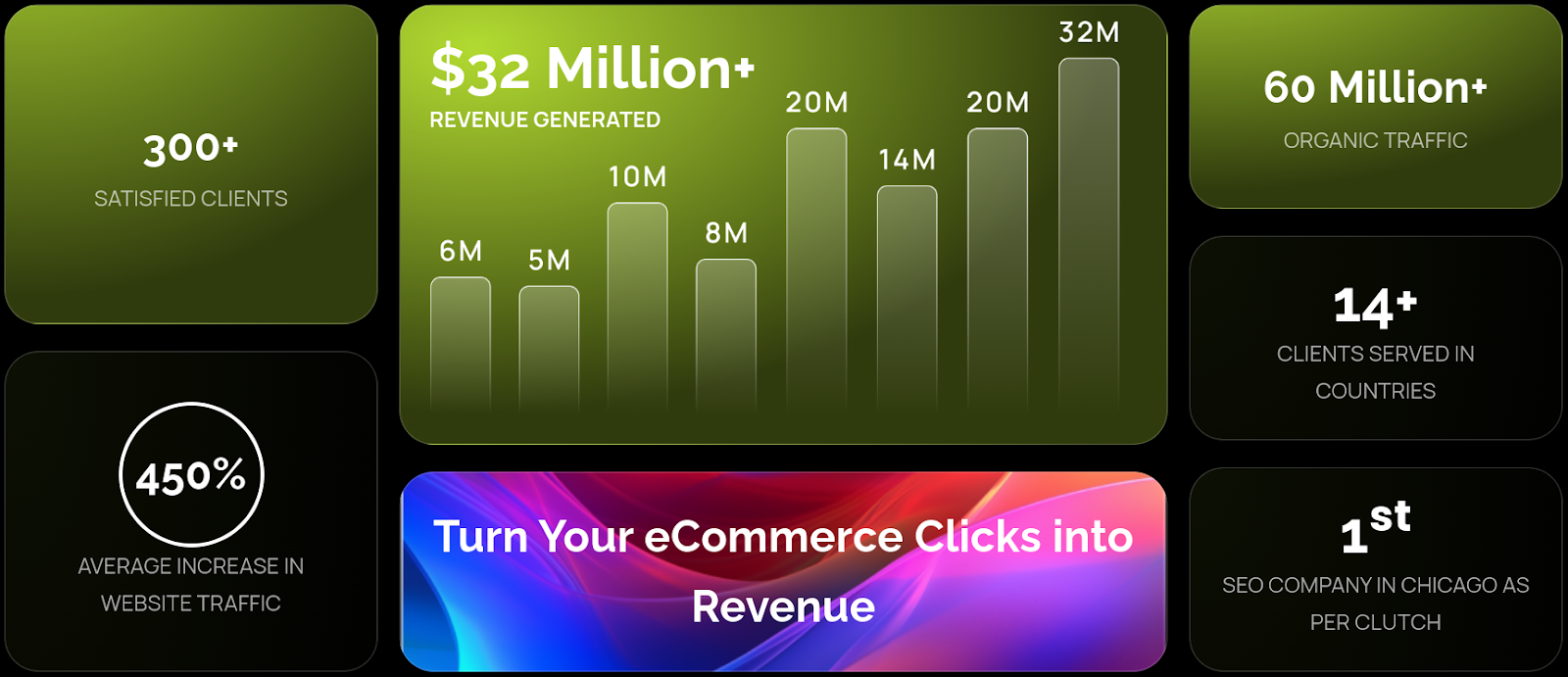
Use visuals to tell a story: Include product photos, stock images, or illustrations that highlight the benefits of what you offer. You can even use infographics to show key metrics like customer satisfaction or growth.
Check ours:
Show people using your product: Use photos of people interacting with your product or service to connect with visitors emotionally.
For example, for a clothing company, you can create a gallery and insert your customer’s pictures in your products like this one:

Pick the right colors: Balance bold and soft colors to make your design stand out without overwhelming the viewer. For consistency, follow a brand guide that outlines your primary and secondary color schemes to ensure your visuals align with your branding and convey the right message.
Optimize images for fast loading: Make sure your images load quickly so visitors don’t leave due to slow load times. You can use RankFast’s webpage image extractor to identify which images need optimization for faster loading times.
Test and refine: Build and test beautiful landing pages that work well on any device to capture leads and boost SEO.
4. Write engaging copy
Once you’ve customized the design, it’s time to add the actual text or copy that will engage and guide your visitors. Writing good copy takes some effort but is key to keeping visitors interested and driving action.
Landing page best practices for writing engaging content:
- Start with an outline: Structure your content with headlines, subheadings, the main text, visuals (images/videos), and clear calls to action (CTAs).
- Write clear and direct headlines: Your headline should quickly grab attention and tell visitors what your page is about.
“Find the Best Deals on Your Favorite Products!”
This headline quickly tells visitors that they can discover great discounts on items they love.
“Shop New Arrivals: Trendy Items Just for You!”
This headline clearly tells that the page features the latest products available for purchase.
- Speak to your audience: Use words like “you” and “your” to make the content feel personal and connect directly with visitors.
- Guide visitors toward action: Every part of your copy should move visitors toward taking the next step, like clicking a button or filling out a form.
- Address your audience’s pain points: Talk about the challenges your audience faces to grab their attention. By showing how your content can help solve their problems, you build a strong connection that encourages them to engage.
5. Include a convincing call to action (CTA)
After explaining your product or service and showing visitors how they can benefit, clearly guide them toward the action you want them to take. This is where your Call-to-Action (CTA) comes in. A clear and specific CTA can increase conversion rates by up to 161%.
Your CTA is likely the most important element on your landing page. It directs visitors to take that next step, whether it’s signing up, purchasing, or downloading something. For an ecommerce website, missing CTA is a big red flag.
6. Create a form (if necessary)
Sometimes, a CTA button alone is insufficient, particularly if you’re targeting multiple types of consumers with the same landing page. In this case, you’ll need to form a form, as seen here:
However, before you create one, think about what information you need from visitors. If all you need is their complete name and email address, ask for that.
Please don’t ask for their phone number, home address, business name, or job title unless you really need it to personalize offers to them.
If you’re not sure how to approach this, know that shorter is better.
7. Test and preview
You’re now ready to publish your landing page!
But first, do a last check to make sure everything on the landing page looks and performs properly.
- Check your content for grammatical or spelling issues that can leave a negative impression on your readers.
- Check your design to verify that all items are properly positioned and structured.
- Check that all links, forms, and buttons work as intended.
- Ensure that the contact information of visitors who click on your CTA button is securely stored in your email marketing and/or CRM solution.
When you’ve checked that everything is correct, click “Publish.”
8. Monitor and optimize
You thought we were finished, right? Not exactly.
After you’ve published your landing page, don’t forget about it; instead, monitor and test it to learn how to keep enhancing its features. The easiest method to do this is via A/B testing.
Some key components you should do trials on are:
The headline
Try several headlines to determine which one connects the most with your target audience.
Visuals
Change the hero picture and the other graphics on your landing page.
Form
If your landing page includes a form, experiment with the number of fields and form location to discover which one(s) convert the best.
CTA
Create a separate CTA button and adjust the associated wording and bit to see which one visitors click on the most.
Landing Page Best Practices You Need to Follow
1. Write a benefit-focused headline
Visitors must know what’s in it for them within seconds. Your title should effectively convey the value of your landing page and offer as the first thing they read.
2. Select an offer picture
The landing pages must always include graphics. A graphic should show how visitors would feel after receiving the offer.
3. Place the lead form above the fold
If the reader wants to convert right away, your lead form should be easy to discover on your landing page. This is another landing page optimization tip.
“Above the fold” implies the form is visible at the top of the page when visitors arrive. This might be a form or its anchor link.
4. Give an appropriate offer
Think of your landing page as a step toward your product or service. Your lead’s personal information is exchanged for your offer. It should be relevant to your company and engaging enough to get visitors to provide their contact details.
5. Remove navigation
Your landing page’s only purpose is to generate leads. Competing links—including internal links to other pages on your website—will detract from that purpose. Reduce additional links on your website to focus your call to action.
6. Make your page responsive
Your landing pages must be responsive like all other website pages to support all viewing experiences. The last thing you want is for your form to disappear on mobile devices. As per the report by Hubspot, 76% of consumers use mobile devices to search online, increasing the need for responsive websites.
Give visitors every chance to convert, regardless of how they access your website. This can be done using tools like a Landing Page Builder that lets you drag and drop, making mobile-optimized landing pages and forms simple.
7. Optimize search
Email blasts, social postings, and other marketing strategies will push people to your landing page, but it should also be optimized with target keywords for paid advertising and organic search.
When someone searches for your keyword, your landing page should appear. The terms you target with paid advertisements should also be on your landing page.
8. Utilize a thank-you page
Send leads to a thank you page once they finish your form. You could display a thank you message on the same page or skip it, but there are several reasons not to. Thank you pages serve three main purposes:
- They provide your promised gift (typically a quick download).
- Let you engage your new lead with appropriate content.
- Show appreciation for their curiosity, which helps convert them into customers.
Create Captivating Landing Pages
To create a landing page that brings in a high return on investment (ROI), you need a great mix of smart design, engaging content, and data-driven strategies. Focus on key elements like a clear value proposition, eye-catching images, and strong calls to action. But why go through all this on your own?
Rankfast is here to help. We specialize in building and optimizing landing pages to boost their performance. With our expert team and data-driven solutions, we can help you increase your ROI and turn visitors into loyal customers.
Let us help you make your landing pages truly outstanding. After all, that’s where your success starts.
FAQs
1. How different is a landing page from the main page of a website?
No, making a homepage and a landing page are two very different things. A landing page is a useful tool for company owners who want to direct visitors to take certain actions, such as signing up for a newsletter or making a purchase. A website’s primary page, or homepage, provides an overview and helps visitors locate what they’re looking for.
2. Can I make a landing page even if I don’t have a website?
A landing page may, in fact, be constructed independently of the remainder of the website. You can design a landing page without knowing how to code using a tool like Hostinger Website Builder. Many email marketing systems have landing page-building tools in their feature sets. Some examples include MailChimp, AWeber, and Constant Contact.
3. What’s the point of creating a landing page?
In order to increase conversions, landing pages highlight important product details and influence the decision-making process. To find out how well your marketing efforts are doing, you may monitor key performance indicators like click-through and bounce rates. Use the data to improve your website in general.
4. Do I need links to other pages on my landing page?
A landing page might include navigation links to advertise several services or incorporate them into an already existing website. Additionally, they may guide visitors to distinct areas on price, features, and support.
Leave a Reply